
Business automation · AI · Morocco
Automate your business with AI and intelligent workflows
We design and build intelligent workflows, AI agents and business automations that handle repetitive tasks, organise your leads, connect your tools and help your team work faster.
The problem
Tools stacked on tools. Leads lost between forms, inboxes and a spreadsheet nobody opens.
How we work it
We map the real workflow, then automate the dull parts and add AI only where it helps a person finish a job.
What you leave with
- Workflow map
- Automation build
- AI experience when it earns its place
- Handover and training
Inside this service
- 01Watch the work
- 02Cut the waste
- 03Build the path
- 04Keep a human in the loop
Capabilities
- Lead routing
- CRM connection
- On-site assistants
- Internal tools
Where it shows up
Automate repetition. Keep human judgment. Grow faster.
From Casablanca to Rabat, Marrakech, Tangier, Agadir and Fès, we help Moroccan businesses turn manual processes into reliable digital workflows.
Business automation · AI · Morocco
What can you automate in your business?
Almost any repetitive process with a clear rule, trigger or workflow can be automated. We start by understanding how your team actually works, then identify where automation removes manual steps that were never worth a person's time.
Lead management
- Capture leads from every channel
- Qualify against your own criteria
- Enrich the record with missing data
- Assign to the right person
- Create or update the CRM entry
- Notify the sales team immediately
- Trigger follow-up sequences
- Track status through the pipeline
Repetitive admin
- Data entry
- Copying information between tools
- Generating recurring reports
- Sending internal notifications
- Updating spreadsheets
- Synchronising databases
- Document processing
- Internal approval steps
Customer communication
- Contact form notifications
- Email sequences
- WhatsApp workflows
- Appointment reminders
- Customer follow-ups
- Answering repeated questions
- Routing support requests
Sales operations
- New lead into the CRM
- Lead qualification
- Sales notifications
- Follow-up sequences
- Proposal workflows
- Customer onboarding
- Pipeline updates
Marketing
- Lead capture from campaigns
- Campaign workflows
- List segmentation
- CRM synchronisation
- Lead scoring
- Performance reporting
- Campaign notifications
Internal operations
- Team notifications
- Automatic task creation
- Approval workflows
- Data synchronisation
- Recurring reports
- Operational dashboards
AI agents that actually work for your business
An AI agent is not simply a chatbot.
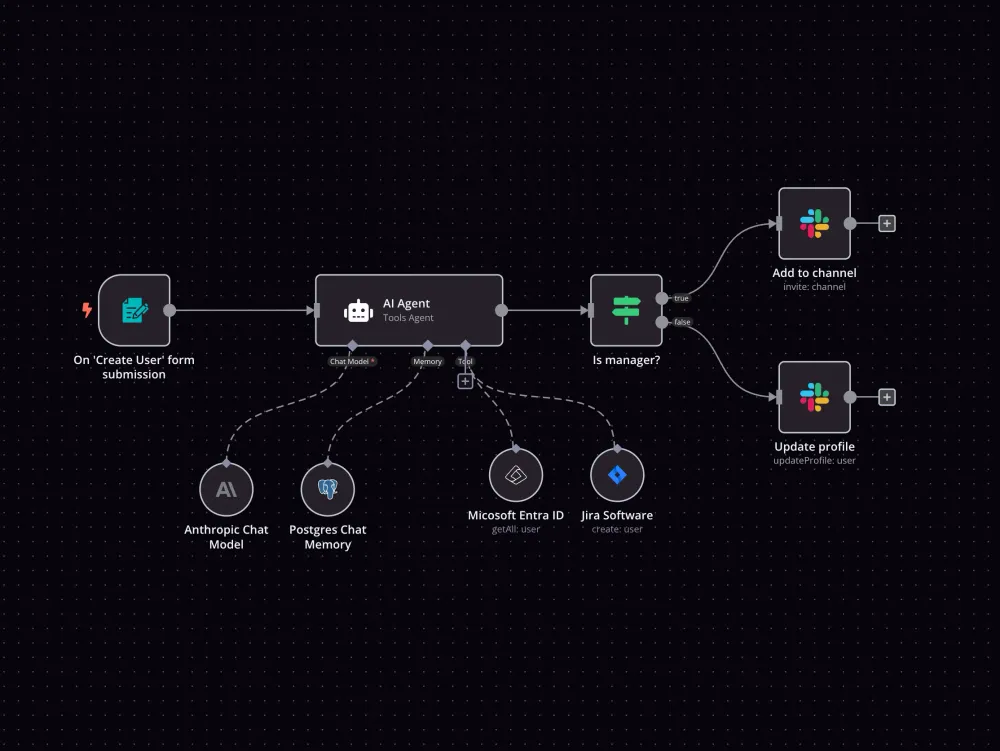
A chatbot answers in a window. An agent is connected to your tools: it reads an incoming request, decides what kind of request it is, pulls the information it needs, acts on the systems you already use, and hands the conversation to a person when the decision matters. The value is not the conversation — it is the actions it can take on the other side of it.
- Understand incoming requests
- Classify and tag information
- Answer common questions
- Qualify leads against your criteria
- Extract structured data from messy input
- Trigger workflows in other systems
- Update your CRM and databases
- Route conversations to the right person
- Assist sales teams with context
- Assist support with drafted replies
- Summarise long threads and documents
- Perform repetitive operational steps
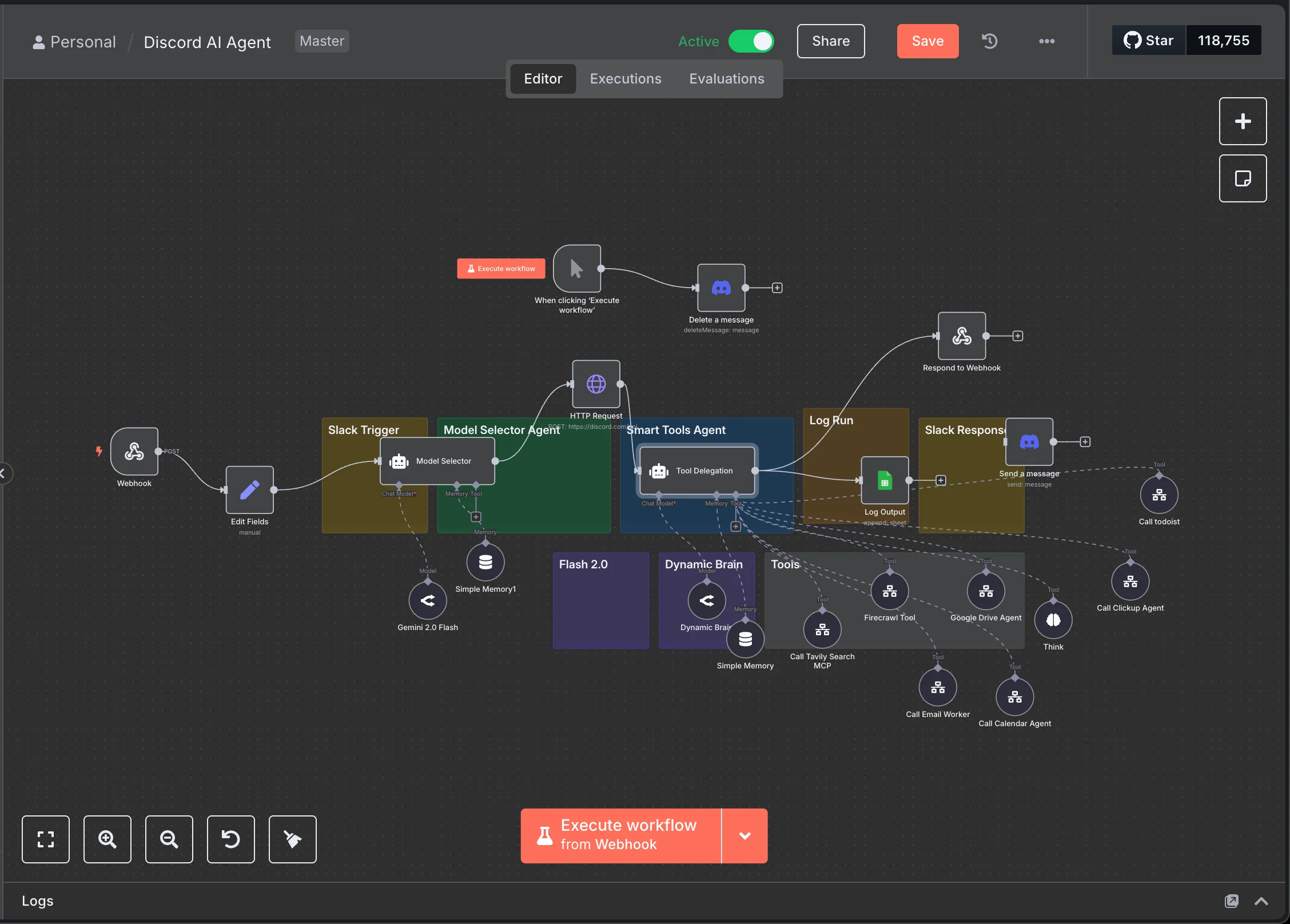
What happens when someone fills in your form
A concrete example of an agent-assisted workflow, from enquiry to human follow-up.
AI handles repetitive decisions and actions. Humans keep control of the important ones.
- Form submitted
- AI analyses the request
- Lead information is structured
- Lead is qualified
- CRM is updated
- Sales team is notified
- Follow-up workflow starts
- A human takes over when needed
Turn repetitive tasks into automated workflows
A workflow is a trigger, a set of steps and a result. Something happens — a form is submitted, an order is placed, a message arrives — and instead of a person copying information from one screen to another, the steps run on their own. You keep the exceptions; the routine stops needing you.
A new website lead
- New website lead
- Save the contact
- Qualify the lead
- Add to the CRM
- Notify sales
- Send a confirmation
- Start follow-up
A new order
- New order
- Update the database
- Notify the team
- Generate an internal task
- Send customer confirmation
- Update reporting
A new WhatsApp conversation
- New WhatsApp conversation
- Identify the intent
- Check customer information
- Route the conversation
- Create a CRM activity
- Notify the responsible person
A new prospect
- New lead
- Enrich the information
- Score the lead
- Detect the sector
- Assign a priority
- Send to the CRM
- Start the sales workflow
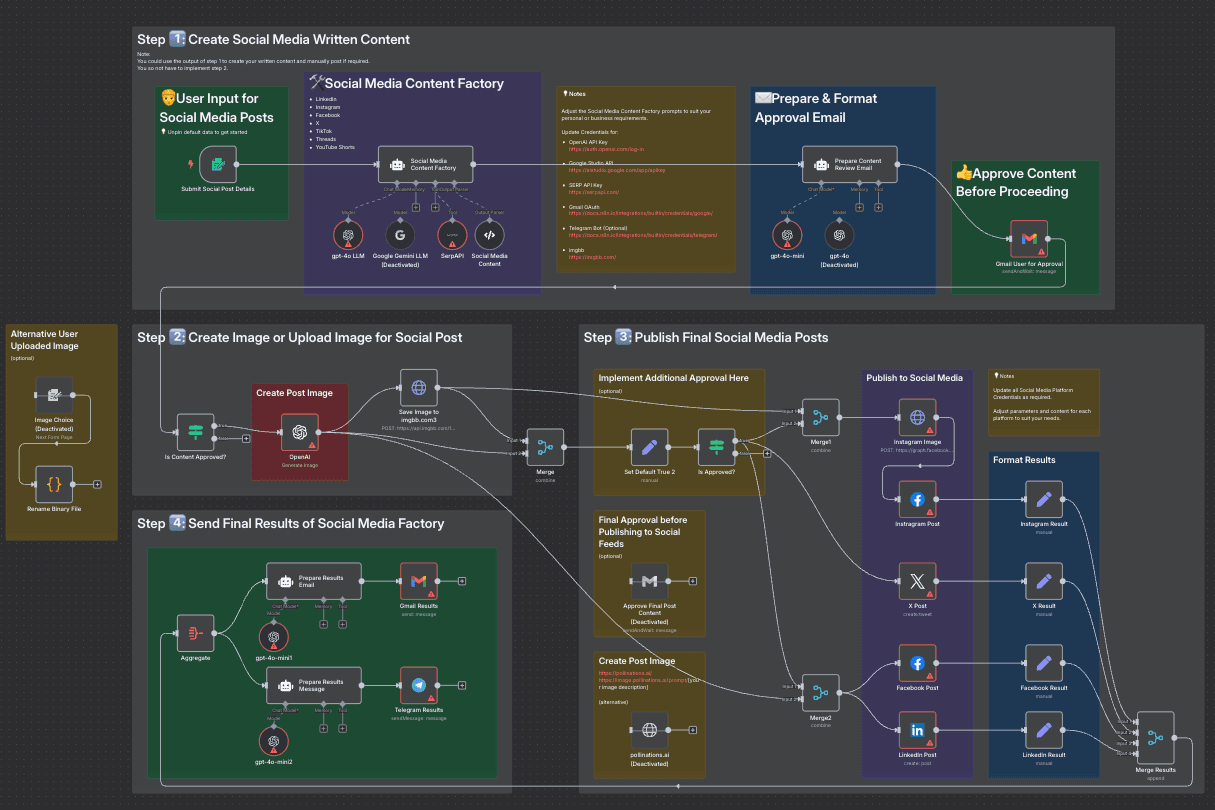
Automate your lead generation
Most businesses do not have a traffic problem — they have a handling problem. Enquiries arrive faster than anyone can process them, land in different places, and go cold while someone is busy. Automation connects marketing to sales so a lead is captured, understood and answered without waiting for a free moment.
Discover → Qualify → Enrich → Route → Follow up → Convert
- Discover potential prospects
- Capture every enquiry in one place
- Qualify against your real criteria
- Score by fit and urgency
- Enrich with missing information
- Route to the right person
- Trigger sales notifications
- Automate follow-up
- Track status until it closes
Where leads normally get lost
- Website forms
- Email inboxes
- Spreadsheets
- The CRM nobody updates
- Social channels
- Phone notes
Stop losing leads between your website, inbox, WhatsApp and CRM. Build one connected workflow.
From manual work to automated workflows
Before
- Lead arrives
- An employee copies the data
- Into a spreadsheet
- Then a WhatsApp message
- Then the CRM, eventually
- Someone notifies the salesperson
- Follow-up happens if remembered
After
- Lead arrives
- Automation processes it
- CRM is updated
- Lead is qualified
- Team is notified
- Follow-up is triggered
- A person handles the real conversation
The goal isn't to automate everything. It's to automate the work that shouldn't require manual effort.
Business automation for companies in Morocco
Moroccan businesses rarely run on one channel. A single customer might find you on Instagram, message on WhatsApp, call the office, then send an email — while the team tracks all of it in a spreadsheet that only one person maintains. Nothing is broken, exactly. It just does not connect, and the cost shows up as slow replies and enquiries nobody followed up.
That is the practical case for automation here, and it has little to do with cutting staff. It is about making sure a WhatsApp message at 9pm becomes a real lead in a real system, that the person responsible knows about it, and that the follow-up happens whether or not someone remembers. We build that connective layer around the tools you already use.
What this looks like by sector
Hotels and hospitality
- Reservation enquiries captured from every channel
- Qualification by dates, party size and request
- WhatsApp enquiries logged like any other lead
- Automatic follow-up on unanswered requests
- Routing to the right team member
- Internal notifications for urgent bookings
Real estate
- Property enquiries centralised
- Qualification by budget, area and timeframe
- Automatic assignment to an agent
- Follow-up sequences that keep running
- CRM updated without manual entry
Restaurants
- Reservation requests handled consistently
- Common questions answered automatically
- Campaign leads captured and tagged
- Notifications to the floor team
- Follow-up with returning customers
E-commerce
- New orders synchronised across tools
- Customer notifications at each step
- Recovery workflows for abandoned orders
- Support requests routed by topic
- CRM and stock kept in sync
Professional services
- Contact requests qualified before the first call
- Appointment workflows and reminders
- Client onboarding sequences
- Document collection and chasing
- Recurring internal reporting
B2B companies
- Prospect discovery and list building
- Lead enrichment from public data
- Scoring by fit and sector
- Routing to the right salesperson
- CRM automation across the pipeline
- Reporting that builds itself
How we build automation
- 01
Understand your business
We map how work currently moves between people, tools and systems — including the steps that only exist in someone's head.
- 02
Find the repetitive work
We identify the tasks that consume time without creating proportional value, and the points where information gets re-typed.
- 03
Design the workflow
We define triggers, actions, conditions, integrations and — just as important — where a human should take over.
- 04
Build and connect
We implement the automation and connect the systems it depends on, with error handling for the cases that will go wrong.
- 05
Monitor and improve
We test the workflow, watch for failures, and adjust it as your business changes. An automation nobody monitors becomes a liability.
What we connect
Your website
Forms, landing pages and customer requests — the entry point most automations start from.
CRM
Lead creation, updates, assignment and pipeline automation, so records stay current without manual entry.
Messaging
WhatsApp Business, email and the other channels your customers actually use to reach you.
Data
Google Sheets, databases and APIs — reading, writing and keeping sources in sync.
AI
Agents, classification, extraction, summarisation and decision support, used where they genuinely help.
Internal tools
Dashboards, notifications, approvals and the operational workflows your team runs every day.
We list the categories we actually work in rather than a wall of logos. If a tool you depend on is not supported, we will tell you at the brief instead of discovering it mid-build.
Automation for businesses ready to scale
SMEs
Small teams where the same few people handle sales, admin and support, and the day disappears into repetition.
Startups
Teams that need to operate like a bigger company before they can afford to hire like one.
E-commerce
Stores where orders, stock, support and customer messages live in separate tools.
Hotels and hospitality
Properties fielding booking enquiries across WhatsApp, email, phone and platforms at once.
Restaurants
Venues handling reservations and repeat questions during service, when nobody is free to reply.
Real estate
Agencies where a shared lead goes to whoever calls back first — so speed of response is the business.
Professional services
Firms that qualify, onboard and chase documents for every new client, the same way each time.
B2B companies
Businesses building a prospect pipeline that needs enrichment, scoring and routing to stay usable.
Sales teams
Teams losing selling hours to CRM updates, follow-up reminders and reporting.
Operations teams
Teams keeping several systems in agreement by hand, and absorbing the errors when they disagree.
Why automate your business?
Save time
Reduce the repetitive manual work that fills a day without moving the business forward.
Reduce human error
Replace copy-paste processes with workflows that run the same way every time.
Respond faster
Trigger actions the moment something happens, instead of waiting for someone to notice it.
Capture more leads
Make sure enquiries do not disappear between your form, your inbox and your phone.
Scale operations
Handle more volume without adding a manual step for every new customer.
Give your team time back
Let people spend their hours on customers, sales and decisions rather than data entry.
What automation connects to
Automation is rarely bought on its own. It usually sits between the things that already generate work — the website, the campaigns, the enquiries — and the systems that have to receive them.
- lead generation automationThe workflow that captures, qualifies and routes an enquiry before anyone touches it.
- e-commerce automationOrder confirmations, cash-on-delivery verification, support routing and stock kept in sync.
- campaign and ads automationCampaign leads captured, scored and passed to sales with the source attached.
- custom web developmentWhen a workflow needs an interface, an internal tool or an integration that does not exist yet.
- SEO and GEO strategyBeing found by people and by AI search — automation only pays once enquiries are arriving.
- local SEO in MoroccoWhere most Moroccan enquiries start: the map pack, before they ever reach your form.
What does a business automation agency do?
A business automation agency analyses repetitive business processes and connects software, data and workflows to reduce manual work. ISTIFANO is a digital growth agency based in Casablanca, Morocco. We build automation workflows, AI agents and lead-generation systems for businesses across Morocco, connecting websites, CRMs, WhatsApp, email and internal tools into one process.
Automation and AI: common questions
What is business automation?
Business automation means letting software carry out a repetitive process instead of a person: a trigger happens, defined steps run, and the result lands where it should. In practice it usually means connecting the tools you already use — website, CRM, WhatsApp, email, spreadsheets — so information moves between them without being re-typed.
How much does business automation cost in Morocco?
It depends on the number of processes, how many systems have to be connected, whether AI is genuinely needed, and how much ongoing maintenance you want. A single workflow connecting a form to a CRM is a small project; an agent-assisted lead system across several channels is not. We scope it in a short brief and then quote — we do not publish invented prices.
How much does an AI agent cost in Morocco?
The cost drivers are the number of tools the agent can act on, how much accuracy the task demands, how much data preparation is needed, and the running cost of the AI model itself. Model usage is an ongoing cost, not a one-off, and we make that explicit in the quote rather than hiding it.
Can you automate repetitive tasks in my company?
Usually yes, but we look first. We map how work currently moves between people and tools, find the steps that consume time without creating value, and tell you which ones are worth automating. Some are not — and we would rather say so than sell you a workflow you will not use.
Can you create an AI agent for my business?
Yes, when an agent is genuinely the right tool. If the task follows fixed rules, a plain workflow is cheaper, faster and more reliable. AI earns its place when the input is messy or unstructured — free-text enquiries, mixed-language messages, documents — and something has to interpret it before the workflow can act.
Can you automate lead generation?
Yes. We build workflows that capture enquiries from every channel, qualify them against your criteria, enrich the record, score by fit, route to the right person and start follow-up automatically. The goal is that no enquiry sits unhandled because everyone was busy when it arrived.
Can you connect my website to my CRM?
Yes — this is one of the most common requests, and usually the highest-return one. A form submission can create or update a CRM record, assign an owner, notify the team and start a follow-up sequence. If your CRM has an API or a supported integration, we can connect it; if it does not, we will tell you before the project starts.
Can you automate WhatsApp workflows?
Yes, through WhatsApp Business and its official API. That covers capturing conversations as leads, routing them to the right person, logging activity in your CRM, sending confirmations and reminders, and notifying your team. WhatsApp does have platform rules on messaging and templates, and we work within them rather than around them.
Is automation suitable for SMEs in Morocco?
Often it suits them better than large companies. In a small team the same few people handle sales, admin and support, so every hour lost to re-typing is expensive. Starting with one workflow — usually leads, from wherever they arrive into one place — costs little and is easy to judge.
Will automation replace my employees?
That is not what we build. Automation should remove the repetitive steps around a job — copying data, sending the same message, chasing an update — so the people doing it can spend their time on customers and decisions. We deliberately design a human handoff into every workflow that touches a real judgment call.
How do I know what I should automate?
Start from where the time goes and where things get dropped. In the discovery step we map the current process, ask what each person repeats daily, and look at where information is re-entered. The tasks that are frequent, rule-based and low-judgment are the ones worth automating first.
How long does it take to build an automation?
A single well-defined workflow — form to CRM to notification — can be live in days. A multi-channel lead system with AI qualification and several integrations takes considerably longer, and most of the time goes into access, edge cases and testing rather than building. We give a realistic timeline after the brief, not before.
Have a repetitive process slowing your team down?
Tell us how your business works. We'll identify where automation can save time, connect your tools and create a workflow built around your actual operations.